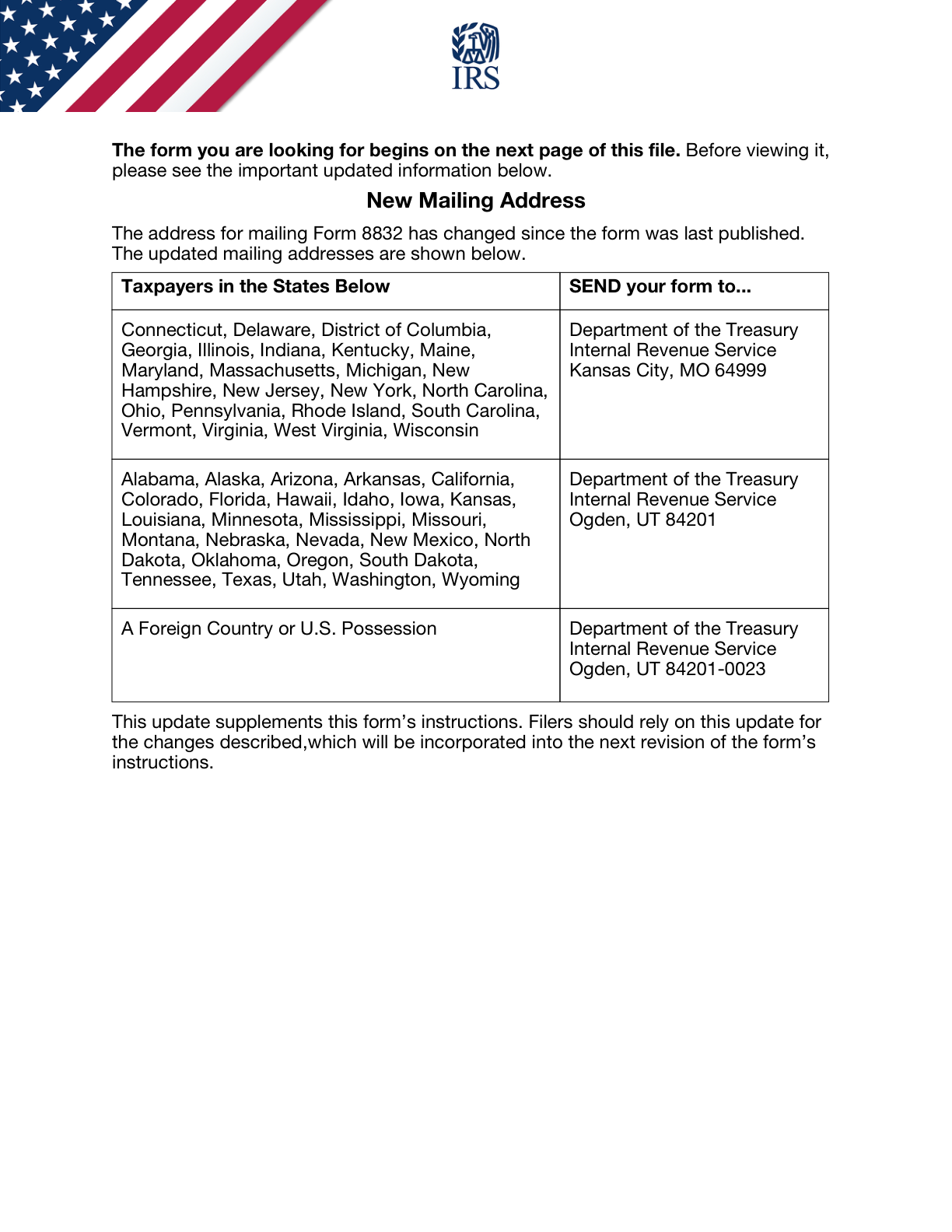
The Current Form 8832 Address Overlay Controls the Mailing Route
· 7 min read
The practical answer
A current filing-address update can sit ahead of older instructions in the same official PDF. Review the whole document, including any address overlay, before copying a recipient from a later page or from an older saved checklist. Three details shape the review: Does the official PDF contain an address update or overlay? Which instruction controls the current route? Has an old saved address been copied without that review?[1, p.1] [1, p.6] [1, p.2]
Scope and the records behind the answer
The discussion follows the entity, form and transaction conditions identified below. The same label on a different form can have a different purpose. Keep the relevant entity and reporting period visible while you compare the requirements, and treat each stated exception as part of the rule rather than an optional footnote.
Official sources checked: 2026-11-09. Annual tax-year forms and continuously revised forms are identified separately in the references.
A side-by-side preparation table
| Item or question | Official rule or instruction | Conditions and limits | Source |
|---|---|---|---|
| Address overlay controls | The updated address sheet at the beginning of the current Form 8832 PDF supersedes the corresponding older addresses in its instructions. Do not continue using an outdated address table from later pages. | Apply this entry within the entity, form and period described here; read the cited passage for the surrounding context. | [1, p.1] |
| Return copy | In addition to filing Form 8832 separately, attach a copy to the entity's return for the election year as instructed, or to the applicable direct or indirect owner's return if the entity has no return-filing obligation. | Apply this entry within the entity, form and period described here; read the cited passage for the surrounding context. | [1, p.6] |
| Field/section Header address / change / relief boxes: Check if: Address change | Enter the address and select applicable address-change or specific late-relief boxes. A relief box requires satisfaction of the corresponding revenue procedure. | Apply this entry within the entity, form and period described here; read the cited passage for the surrounding context. | [1, p.2] |
| Field/section 1b: Change in current classification. | Select this item to change the existing classification and continue to line 2a. | Apply this entry within the entity, form and period described here; read the cited passage for the surrounding context. | [1, p.2] |
| Field/section Header name: Name of eligible entity making election | Enter the name of the eligible entity making the election. | Apply this entry within the entity, form and period described here; read the cited passage for the surrounding context. | [1, p.2] [1, p.7] |
| Field/section 4b: Identifying number of owner | For an entity with only one owner, enter that owner's applicable SSN, ITIN or EIN. A foreign owner without a U.S. identifying number enters none as instructed. Where ownership passes through multiple disregarded entities, identify the non-disregarded owner required by the instructions. | Apply this entry within the entity, form and period described here; read the cited passage for the surrounding context. | [1, p.2] [1, p.7] |
Work through the official requirements
Address overlay controls
The updated address sheet at the beginning of the current Form 8832 PDF supersedes the corresponding older addresses in its instructions. Do not continue using an outdated address table from later pages.[1, p.1]
Return copy
In addition to filing Form 8832 separately, attach a copy to the entity's return for the election year as instructed, or to the applicable direct or indirect owner's return if the entity has no return-filing obligation.[1, p.6]
Field/section Header address / change / relief boxes: Check if: Address change
Enter the address and select applicable address-change or specific late-relief boxes. A relief box requires satisfaction of the corresponding revenue procedure.[1, p.2]
Field/section 1b: Change in current classification.
Select this item to change the existing classification and continue to line 2a.[1, p.2]
Field/section Header name: Name of eligible entity making election
Enter the name of the eligible entity making the election.[1, p.2] [1, p.7]
Field/section 4b: Identifying number of owner
For an entity with only one owner, enter that owner's applicable SSN, ITIN or EIN. A foreign owner without a U.S. identifying number enters none as instructed. Where ownership passes through multiple disregarded entities, identify the non-disregarded owner required by the instructions.[1, p.2] [1, p.7]
Field/section 5a: Name of parent corporation
If the entity is owned by affiliated corporations filing a consolidated return, enter the parent's name as directed.[1, p.2]
Field/section 5b: Employer identification number
Enter the parent's EIN corresponding to line 5a, rather than confusing it with the electing entity's own EIN.[1, p.2]
Field/section 6a: A domestic eligible entity electing to be classified as an association taxable as a corporation.
Use this item when a domestic eligible entity elects taxation as a corporation.[1, p.3]
An illustrative preparation scenario
In this hypothetical preparation example, a preparer opens a saved copy at the instruction pages and copies a familiar address. A complete document review then identifies a preceding address-update page. The filing file compares those instructions before the envelope is prepared, rather than treating the older page as automatically controlling. The preparer checks three points: Does the official PDF contain an address update or overlay? Which instruction controls the current route? Has an old saved address been copied without that review? The file remains a working comparison until the relevant facts and applicable instructions have been checked together. No agency outcome is assumed.[1, p.1] [1, p.6] [1, p.2]
This is a planning illustration, not a statement that a particular filing has been accepted or that an entity qualifies for a tax result. Use the source-backed distinctions above to decide what information still needs to be established before a form is completed.
A review sequence you can actually use
- Does the official PDF contain an address update or overlay?
- Which instruction controls the current route?
- Has an old saved address been copied without that review?
Write down the answer and the record that supports it, rather than marking a question complete because a field contains text. When two records disagree, identify whether the difference concerns the entity, an individual, the reporting period or the type of change. That makes the remaining question specific enough to resolve against the relevant instruction.
Keep the scope of a preparation service separate from the government requirement. A service intake question may gather information for a workflow; it does not create an exception, extend a deadline or determine whether a transaction is reportable. The cited government material remains the basis for those conclusions.
Questions to settle before moving forward
How should I check field/section header address / change / relief boxes: check if: address change?
Enter the address and select applicable address-change or specific late-relief boxes. A relief box requires satisfaction of the corresponding revenue procedure. [1, p.2]
How should I check field/section 1b: change in current classification.?
Select this item to change the existing classification and continue to line 2a. [1, p.2]
How should I check field/section header name: name of eligible entity making election?
Enter the name of the eligible entity making the election. [1, p.2] [1, p.7]
How should I check field/section 4b: identifying number of owner?
For an entity with only one owner, enter that owner's applicable SSN, ITIN or EIN. A foreign owner without a U.S. identifying number enters none as instructed. Where ownership passes through multiple disregarded entities, identify the non-disregarded owner required by the instructions. [1, p.2] [1, p.7]
Official sources and versions
- Form 8832 (Rev. December 2013) — Rev. December 2013
Get help with the relevant SpeedEIN workflow
SpeedEIN offers preparation and support for the situations described on its service pages. If you would like assistance, review the relevant service scope, supported entities and current availability before ordering. The service does not replace the government’s decision or remove an obligation imposed by the applicable rules.