The Data Changed After Approval: Keep the Signed Version and Revised Instructions Aligned
· 6 min read
The answer for this situation
A preparation project can be accurate when approved and become unclear a day later. The owner supplies a new address, corrects a name or changes an instruction, while a signed PDF from the earlier stage remains in the conversation. The answer is not to treat every attachment as equally current. Create a change log linking the new fact to the affected document and the version that was previously approved. This lets the preparer distinguish a data correction from a changed instruction and identify what still needs confirmation. It does not establish a universal IRS rule that every edit always requires, or never requires, a new signature.[1] [2, p.6] [3, p.2]
Which facts change the answer?
Signature and authority requirements are document-specific. SS-4, Form 8822-B and Form 8832 identify their applicable signer or consent arrangements, while IRS electronic-signature permission must be established for the relevant document and procedure. An accepted technology in one interaction is not permission for every form or transmission channel. Any other return or special filing package needs its own official signature and authority check; a rule from another form does not settle that question. A version log is an editorial coordination method. Any signature, consent or authorization action must be determined under the rules governing the actual document and facts, rather than a blanket workflow assumption.[1] [2, p.6] [3, p.2]
The official requirements, compared
| Question or field | Official instruction | Conditions and limits | Source |
|---|---|---|---|
| Document specific permission | IRS electronic-signature permission must be established for the specific document and IRS procedure. A list of acceptable signature technologies is not blanket approval to e-sign every IRS form. | IRS guidance permits the signature form and signing process for the specific form or document. The document's identity-verification and other applicable conditions are also met. Do not infer IRS acceptance from general e-signature law or a product's signing functionality. | [1] |
| Authorized signer | The authorized SS-4 signer depends on the type of applicant. A foreign applicant may use a person with appropriate authorization to sign. | — | [2, p.6] |
| Signature authority | Form 8822-B is signed by an owner, officer, general partner, LLC member manager, plan administrator, fiduciary or authorized representative, as applicable. | — | [3, p.2] |
| Consent signatures | Obtain the Form 8832 consent signatures required from applicable members or owners, or an appropriately authorized person. A retroactive effective period can require consent from former owners as well. | — | [4, p.7] |
| Designee scope | The third-party designee may answer questions about the completed SS-4 and receive the new EIN. Signed authorization is required, and that authority ends when the EIN is assigned and released to the designee. | — | [2, p.6] |
| Channel and interaction limits | The IRM's acceptance of signature images or digital signatures in specified IRS employee-taxpayer interactions is limited to those interactions and authorized procedures. Returns still follow their own filing instructions, and transmission and receipt follow IRS procedures. Signature permission does not approve every email, fax or e-filing channel. | Only the authenticated employee interactions or IRS-initiated campus compliance interactions specified in IRM 10.10.1.6.1 are covered. Follow the applicable identity-verification and IRS transmission procedures. Ordinary original returns, other forms and other channels require their corresponding official guidance. | [1] |
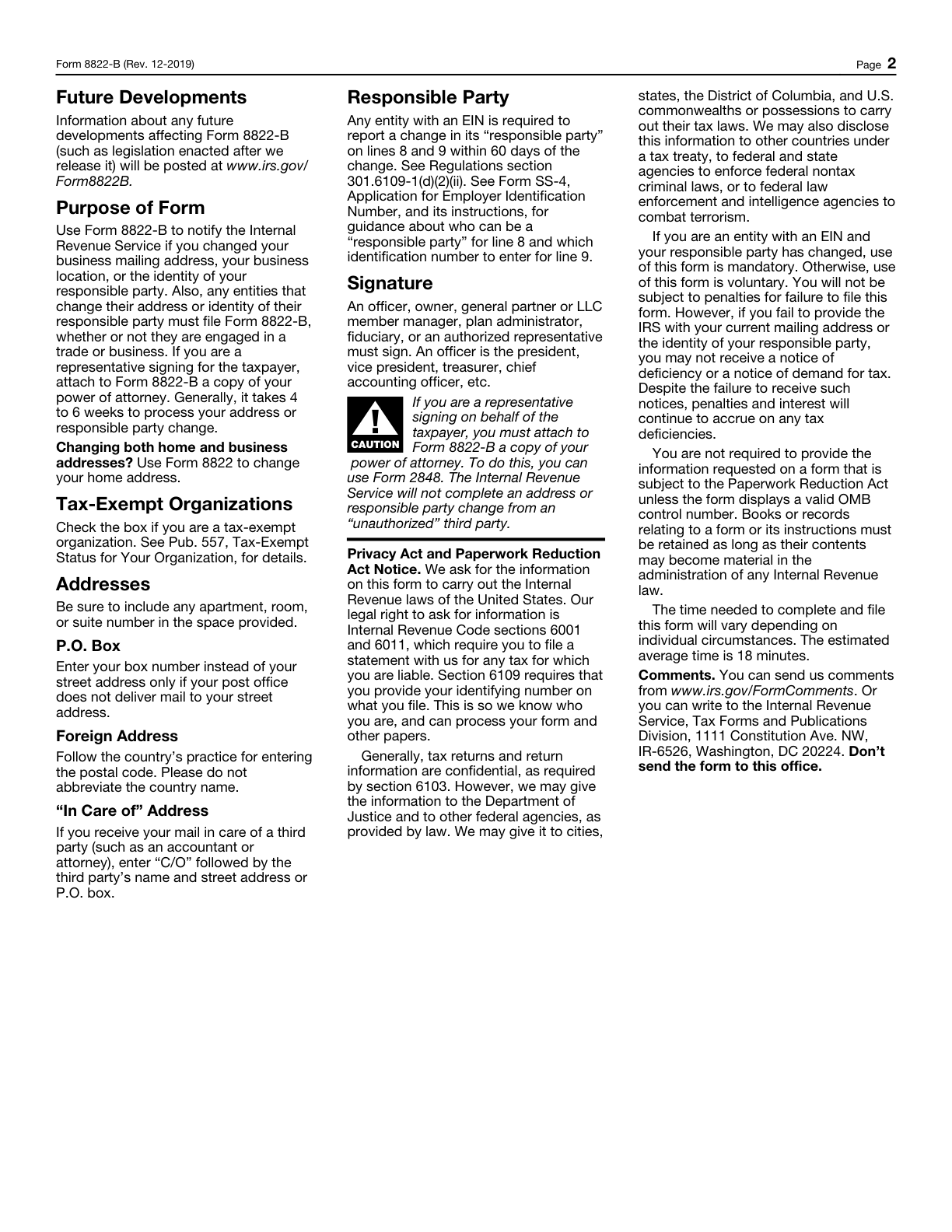
Read the requirements in context
Legal name
Line 1 requires the applicant's legal name, consistent with the applicable Social Security card, formation document or other legal document.[2, p.2]
Records sufficiency
Keep permanent books and records sufficient to establish the correctness of the federal return and the treatment of related-party transactions, together with the detailed requirements of Regulations section 1.6038A-3.[5, p.3]
A worked preparation example
This example is hypothetical; it shows how to organize the facts, not an agency decision.
Consider a hypothetical owner, Amira, who approved an SS-4 draft and supplied the applicable authorization for that version. Before the next stage, she sends a correction to the business mailing address. The preparer now has an approved earlier PDF, a revised data record and a message containing the change. If one person simply chooses the newest filename while another uses the signed attachment, the project can split into inconsistent versions. Amira's log identifies the old entry, the correction, its source and the document affected. It records who needs to confirm the change and which version is currently held for review. The preparer then considers the applicable authorization and signature requirements for that changed document instead of assuming the previous approval covers every subsequent edit. When the next version is ready, the project notes exactly what was confirmed and which file is intended for submission. Earlier versions remain identifiable as history rather than being silently renamed final. The example does not prescribe a signature cure or determine validity of a particular application. Its purpose is to ensure that a form is not advanced merely because someone sees an approval that actually referred to a different set of facts.[1] [2, p.6] [3, p.2]
Turn the records into a usable filing plan
Make the latest instruction easy to locate, but preserve how it relates to the prior approval. Distinguish corrected factual data, changed requests and formatting adjustments so that the right question is assessed. Ask whether the approved signer or consenting owner has reviewed the relevant content under the actual form requirements; do not infer authority from a helper's access to the task. SpeedEIN's preparation workflow should reflect the agreed scope and current facts without promising a universal signature method. Before submission, identify one intended version and resolve open authorization questions. A clear history reduces confusion without inventing an extra government certification or treating internal approval labels as an IRS decision.[1] [2, p.6] [3, p.2]
Three checks before you proceed
- What changed, and which previously approved document does the change affect?
- Has the actual form's signature or consent question been assessed rather than assumed?
- Can every participant identify the same intended submission version and the remaining open items?
Related preparation guides
- One Client, Several IRS Forms: Build a Signature-and-Authority Matrix
- Choosing Self-Preparation or Paid EIN Help: Compare the Work and Responsibility
- SS-4 Signature Methods: Check the Specific Form and Submission Channel
Official sources and document versions
Official source versions checked: 2026-11-10
- Part 10. Security, Privacy, Assurance and Artificial Intelligence
- Instructions for Form SS-4 (Rev. December 2025) — Rev. December 2025
- Form 8822-B (Rev. December 2019) — Rev. December 2019
- Form 8832 (Rev. December 2013) — Rev. December 2013
- Instructions for Form 5472 (Rev. December 2024) — Rev. December 2024
Get help with the relevant SpeedEIN service
SpeedEIN provides preparation and support within the scope described on its service pages. Review the supported entity types, required information and current service scope before ordering. IRS decisions, processing and any applicable filing or payment obligations remain governed by the official rules.